1. Export a CSV marker file from Pix
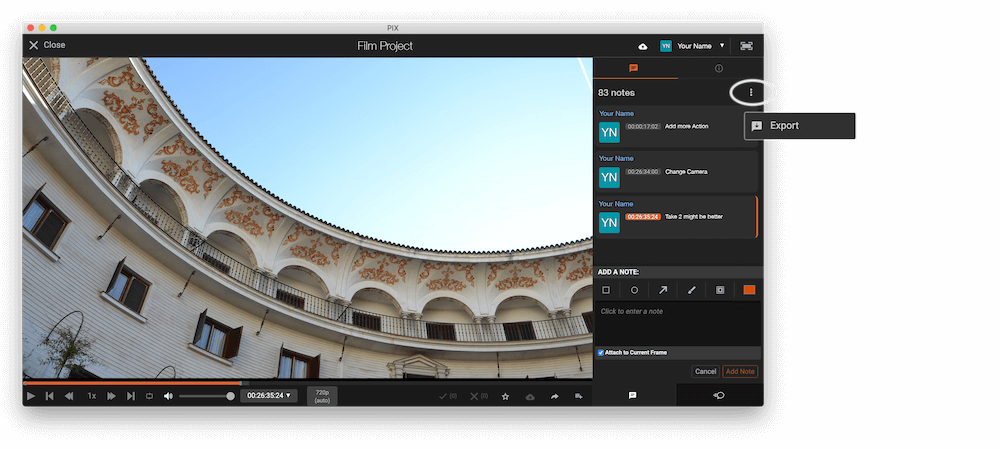
Open the comments panel on the right side in Pix. Press the three dots and select "Export". Now you can then download the CSV file from Pix.
2. Use the "Markørkonverterer" to convert the CSV marker file into a SRT subtitle file
Open the free Markørkonverterer, select "Pix Systems > Comments (.csv)" and set "convert" to "SRT". Generate and download the file. Hvis du har problemer med å konvertere filen, kan du kontakte den gratis kundestøtten.
3. Use the "Verktøy og omformer for undertekster" to convert the SRT subtitle file into an Avid DS (Subcap) subtitle file
Open the free Verktøy og omformer for undertekster, select "SRT" and set "convert" to "Avid DS (Subcap)". Generate and download the file. Hvis du har problemer med å konvertere filen, kan du kontakte den gratis kundestøtten.
🚀 Ferdig
Det var alt for nå! Hvis du syntes denne veiledningen var nyttig, del den gjerne for å støtte oss. Hvis du har forslag til hvordan vi kan forbedre arbeidsflyten, gi oss beskjed!