1. Export a CSV marker file from Frame.io
Export comments from Frame.io in the video comments menu "Download to File" > "CSV".
2. Use the "Markørkonverterer" to convert the CSV marker file into a CSV file
Open the free Markørkonverterer, select "Frame.io > Comments (.csv)" and set "convert" to "CSV for Google Sheets". Generate and download the file. Hvis du har problemer med å konvertere filen, kan du kontakte den gratis kundestøtten.
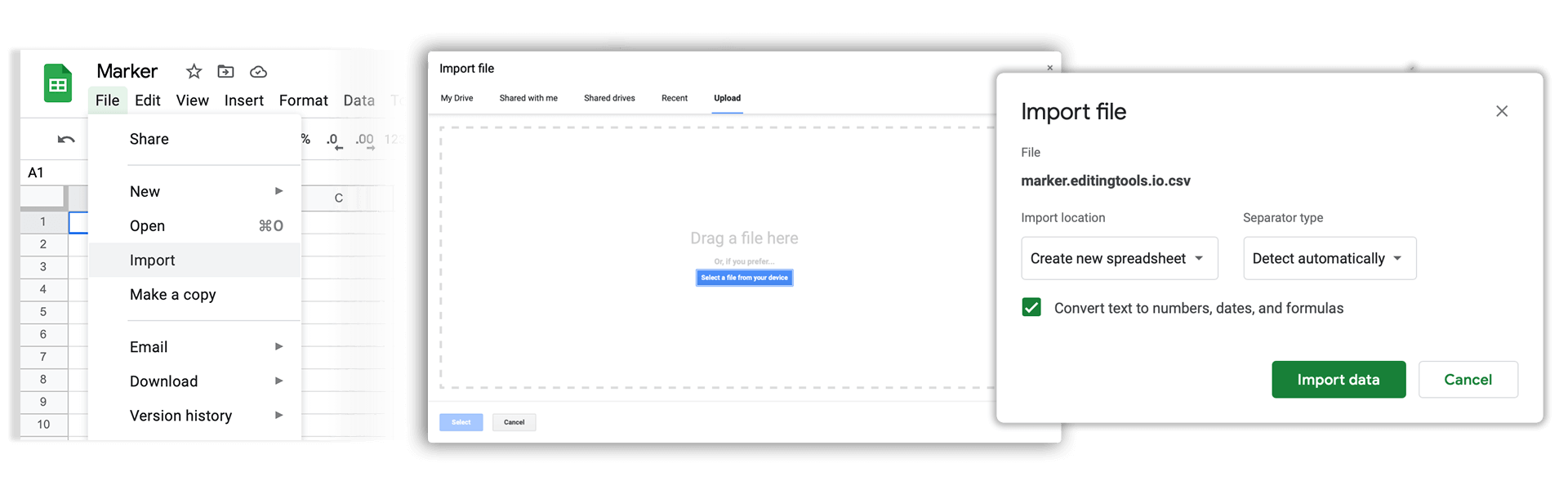
3. Import the CSV file into Google Sheets
Open Google Sheets and go to "File -> Import". Upload the generated CSV file and press "Import Data" to generate the Sheet with all markers.
🚀 Ferdig
Det var alt for nå! Hvis du syntes denne veiledningen var nyttig, del den gjerne for å støtte oss. Hvis du har forslag til hvordan vi kan forbedre arbeidsflyten, gi oss beskjed!